Mouse Scroll Wheel Test
Hover over the box below and scroll your mouse wheel. Instantly detect if your scroll encoder is jumping or scrolling in the wrong direction.
Mouse Scroll Jump Test (Hardware Diagnostic)
A healthy mouse wheel should send a clean, continuous signal in the direction you are scrolling. However, aging gaming mice (particularly those from Razer, Logitech, and Corsair) often develop a hardware fault where scrolling continuously downwards occasionally sends an "Up" signal to the computer. This mouse scroll jump test is designed to catch these rogue electrical signals.
How Our Diagnostic Engine Works
When you hover over the diagnostic zone and begin scrolling, our engine analyzes the `WheelEvent.deltaY` data stream. If you scroll sequentially in one direction (e.g., DOWN, DOWN, DOWN) but the hardware injects a microsecond contrary signal (UP) without a natural pause in your hand movement, our system instantly flags it as a "Scroll Jump Detected" hardware error.
Why is My Mouse Scrolling the Wrong Way?
If you are frustrated asking "why is my mouse wheel scrolling the wrong direction?", the culprit is almost always the mechanical rotary encoder located inside the mouse shell. Here is exactly what happens on a physical level:
- Dust and Debris Build-up: The mechanical encoder reads rotational movement via tiny metal contacts rubbing against a wheel. If a pet hair or pocket of dust gets lodged between these contacts, the sensor misreads the rotation direction.
- Oxidation of the Encoder Pins: Over time, humidity causes the copper or silver contacts inside the TTC or ALPS encoder to oxidize. This oxidation scrambles the electrical current, sending erratic UP and DOWN signals simultaneously.
- Weakened Tension Spring: The tactile "bumps" or steps you feel when scrolling are created by a tension spring. If this spring wears out, the wheel can easily jiggle backwards slightly between steps, sending a reverse signal to your PC.
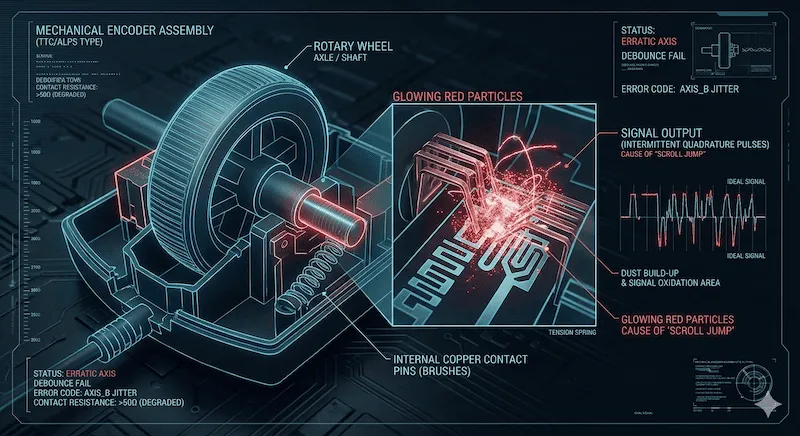
Diagnosing Scroll Behaviors
Use the log output from the tool above to determine the health of your hardware based on this table:
| Test Result / Symptom | Likely Cause | Recommended Action |
|---|---|---|
| Clean, consistent UP/DOWN logs. | Healthy hardware. | No action needed. If you still have issues in specific games, check your software bindings. |
| Occasional Red "JUMP" Errors. | Early-stage encoder oxidation or dust blockage. | Try blowing compressed air into the wheel gap. |
| Constant Jumps / Extreme Jitter. | Severe encoder hardware failure. | The encoder must be desoldered and replaced, or the mouse needs to be RMA'd. |
How to Fix Mouse Scroll Wheel Jumping
Before you throw away an expensive gaming mouse because of erratic scrolling, try these proven repair methods. We rank them from easiest to most advanced:
- The Compressed Air Method: Turn the mouse upside down. Roll the wheel vigorously while blasting compressed air straight into the gap between the wheel and the left/right click buttons. This dislodges hair and dust from the encoder pins.
- The Contact Cleaner Flush (Highly Effective): Unplug the mouse. Spray a tiny amount of electrical contact cleaner (like WD-40 Specialist Electrical Contact Cleaner - do not use regular WD-40 lubricant) directly into the encoder mechanism. Scroll the wheel rapidly for 60 seconds to grind away the oxidation. Let it dry completely before plugging it back in.
- Solder a New Encoder: For hardware enthusiasts, you can open the mouse shell, locate the 3-pin mechanical encoder (make sure to measure its height in millimeters, usually 9mm to 11mm), desolder the broken unit, and solder a brand new TTC Gold or ALPS encoder onto the PCB.
If your scroll wheel feels perfectly fine, but your left or right click is registering twice, make sure to check out our Mouse Double Click Test.
Frequently Asked Questions (FAQ)
Can I fix mouse scroll jumping without opening the mouse?
Yes. Often, simply blowing compressed air into the wheel gap or vigorously scrolling the wheel upside down on a clean sheet of paper can dislodge the dust causing the erratic signal.
Is reverse scrolling a Windows or Mac setting issue?
It depends. If your mouse consistently scrolls the opposite way of what you expect, that is an OS setting (Mac calls this "Natural Scrolling"). However, if the page scrolls down fine but randomly jerks upwards during the motion, that is a hardware encoder fault.
Do optical scroll wheels suffer from jumping?
Optical scroll wheels (found on older Logitech mice like the G502 series) use an infrared beam instead of physical metal contacts. They are generally immune to oxidation and jumping, but they can still fail if severe dust blocks the optical sensor.
Hardware References
The signal detection logic used in this test interprets standard HID mouse wheel events as documented by the W3C UI Events Specification. For detailed encoder replacement tutorials, we recommend the community guides available on r/MouseReview.