Keyboard Ghosting Test (NKRO)
Press as many keys as possible simultaneously. Discover your keyboard's rollover limit and check for ghosting.
What is Keyboard Ghosting?
Keyboard ghosting is a hardware limitation where a keyboard fails to register a keystroke because too many other keys are being pressed simultaneously. If you are playing a fast-paced PC game and need to run diagonally while jumping and reloading (e.g., pressing `W + D + Space + R`), a ghosting keyboard might drop the `R` key, preventing you from reloading.
The Matrix Circuitry Issue
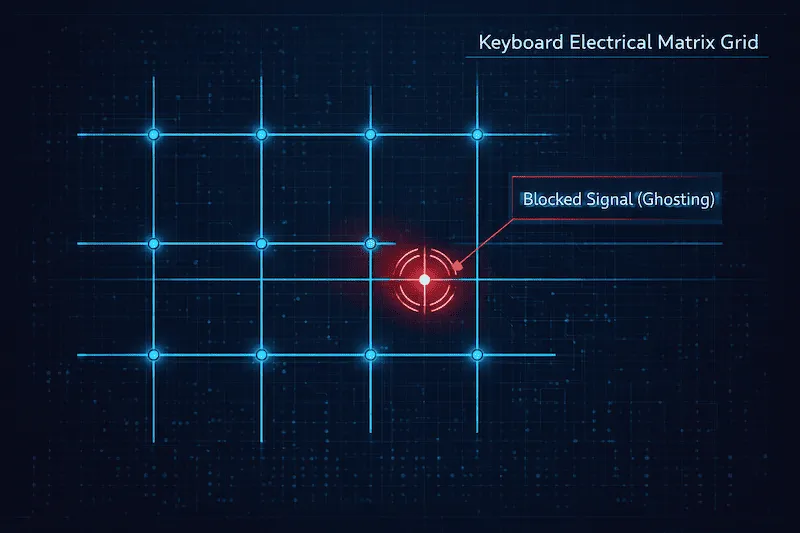
To save manufacturing costs, non-mechanical keyboards (membrane keyboards) wire their keys together in a grid called a "matrix". When you press certain combinations of keys that share the same rows and columns in this grid, the electrical signal gets confused. The controller either registers a key you didn't press (a "ghost") or entirely drops the signal of the key you did press (key blocking).
N-Key Rollover (NKRO) vs 6-Key Rollover (6KRO)
The term Rollover refers to how many simultaneous key presses a keyboard can handle before it stops registering new inputs. When purchasing a new gaming keyboard, you will commonly see these two specifications:
| Specification | Meaning | Best Used For |
|---|---|---|
| 2KRO / 3KRO | Can only register 2 or 3 keys simultaneously. | Basic office work, slow typing. Unsuitable for gaming. |
| 6-Key Rollover (6KRO) | Can register up to 6 standard keys + modifier keys (Shift, Ctrl, Alt) at the same time. | Standard USB protocol limits. Excellent for 90% of gaming scenarios (FPS, MOBA). |
| N-Key Rollover (NKRO) | Can register every single key on the keyboard simultaneously. No limits. | Hardcore gaming, rhythm games (osu!), and professional eSports hardware. |
How to Test Keyboard Ghosting
Using our visual Ghosting Test tool above is the easiest way to find your hardware limit. Here is how to perform a thorough diagnostic:
- The "Palms Down" Limit Test: Click the test area to activate it. Place both of your palms flat across the middle of your keyboard and press down. Check the "Max Rollover" number. If it stops at 4 or 6, your keyboard is not NKRO.
- The FPS Gamer Test: Hold down the typical movement keys (`W`, `A`, `S`, `D`), then try holding `Shift` and `Spacebar`. While holding all those, try pressing `Q`, `E`, and `R`. If the new letters do not appear in the visualizer, you have a ghosting issue on that cluster.
- The Two-Player Test: If you play local split-screen games, have one person hold the Arrow Keys and another hold the WASD cluster. Try pressing action keys to see if inputs get blocked.
If you suspect an individual switch is physically broken rather than suffering from a matrix ghosting issue, use our Computer Keyboard Test to diagnose dead switches individually.
Frequently Asked Questions (FAQ)
What does N-Key Rollover (NKRO) mean?
N-Key Rollover (NKRO) means that a keyboard can correctly register every single key being pressed at the same time, without dropping any inputs or experiencing ghosting. The "N" stands for "any number".
How can I fix keyboard ghosting?
Keyboard ghosting is a physical hardware limitation of the internal circuit matrix. Unfortunately, it cannot be fixed with software updates, drivers, or registry hacks. The only solution is to purchase a modern "Anti-Ghosting" or mechanical keyboard that supports NKRO.
Why does my NKRO keyboard only register 6 keys in the test?
If you know you bought an NKRO mechanical keyboard but the test maxes out at 6 keys, you might be limited by your USB connection or OS settings. Some keyboards require you to press a specific function shortcut (e.g., `Fn + N`) to switch from USB 6KRO mode to full NKRO mode.
Does a ghosting test work on laptops?
Yes. Laptop keyboards are notoriously prone to ghosting because manufacturers aggressively optimize the internal matrix to fit in a thin chassis. Most non-gaming laptops are strictly limited to 2KRO or 3KRO.
Technical References
The concepts of keyboard matrix logic, diodes, and USB HID descriptor limits (which restrict standard generic keyboards to 6KRO) are based on hardware engineering documentation provided by the USB Implementers Forum (USB-IF).