10 Key Typing Test Online
Measure your Keystrokes Per Hour (KPH) on the numeric keypad. Prepare for data entry, banking, and accounting interviews with our free tool.
KPH Test (Keystrokes Per Hour) Explained
While standard English typing tests measure speed in WPM (Words Per Minute), professional numerical data entry requires a different metric. The KPH Test measures exactly how many individual keys you press in a one-hour period. Our 10 key typing test calculates this dynamically: it counts every number you type correctly, plus the Enter key used to submit the string, and projects that speed over a full hour.
Why is Enter Included in KPH?
In real-world data entry (like filling out Excel spreadsheets or bank ledger software), you must press the Enter or Tab key to move to the next cell. The Enter key is an essential part of the 10-key muscle memory, which is why our algorithm counts it as a valid keystroke toward your final score.
What is a Good KPH Score? (Data Entry Standards)
If you are applying for a job as a bookkeeper, medical billing specialist, or general data entry clerk, the HR department will likely test your 10 key speed. Use the following industry-standard benchmarks to evaluate your current proficiency:
| Skill Level | KPH Score | Accuracy Target |
|---|---|---|
| Beginner / Unqualified | Under 5,000 KPH | < 90% (Prone to costly financial errors) |
| Entry Level Data Clerk | 8,000 - 10,000 KPH | 95% Minimum |
| Professional / Bank Teller | 10,000 - 12,000 KPH | 98% - 100% |
| Expert (10-Key Master) | 12,000+ KPH | 99% - 100% |
Data Entry Typing Test Practice Tips
Achieving a professional KPH score requires abandoning the "hunt and peck" method. You must develop pure muscle memory so you can stare at the physical paper documents while your hand operates the keypad blindly. Here is how to position your hand for optimal data entry typing test practice:
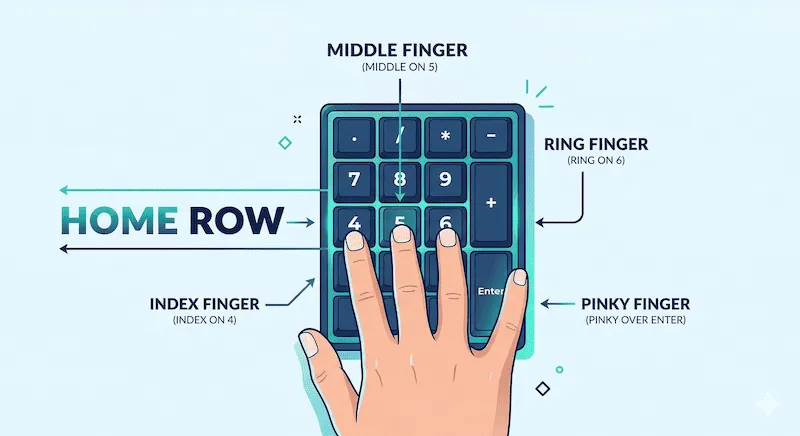
- Locate the Bump: Place your right middle finger on the
5key. You will feel a small physical tactile bump on this key. This is your anchor. - The Home Row: Your index finger rests on the
4, your middle finger on the5, and your ring finger on the6. - Top and Bottom Rows: Your index finger reaches up for
7and down for1. Your ring finger reaches up for9and down for3. - The Thumb: Keep your thumb resting naturally on the large
0key at the bottom. - The Pinky: Dedicate your pinky finger exclusively to the tall
Enterkey on the far right.
If you feel your numeric keypad is stiff or missing inputs during rapid entry, you can quickly diagnose individual switch functionality using our Computer Keyboard Test.
Frequently Asked Questions (FAQ)
What is a 10 key typing test?
A 10 key typing test assesses your speed and accuracy when entering numbers using the numeric keypad found on the right side of a standard computer keyboard. It simulates real-world accounting and banking data entry tasks.
How is KPH calculated?
KPH (Keystrokes Per Hour) is calculated by taking your total valid keystrokes within the testing timeframe (e.g., 60 seconds), and multiplying it mathematically to project how many keys you would hit if you maintained that exact speed for a full 60-minute hour.
Do laptop keyboards have a 10-key pad?
Most standard 13-inch and 14-inch laptops do not have a dedicated 10-key number pad due to space constraints. If you are applying for a data entry job, you should use a 15-inch+ laptop or purchase an external USB numeric keypad for practice.
Employment References
The KPH benchmarking standards cited above are commonly utilized by global staffing agencies such as Robert Half and Kelly Services during the candidate screening process for administrative and financial roles.