Mouse Polling Rate Test
Measure your gaming mouse Hz in real-time. Move your cursor rapidly in continuous circles inside the box below to find your peak reporting rate.
What is Mouse Polling Rate (Hz)?
Mouse polling rate, measured in Hertz (Hz), defines how frequently your mouse reports its physical position to your computer's operating system. For example, if your mouse operates at a 1000Hz polling rate, it sends its coordinates to the CPU 1,000 times every single second. This translates directly to sensor latency.
Using our mouse hz checker above, you can verify if the expensive gaming mouse you just purchased is actually delivering the performance advertised on the box. In competitive games like Valorant or CS2, a higher polling rate ensures your crosshair tracks your hand movements with zero perceptible delay.
Polling Rate vs DPI
Do not confuse polling rate with DPI (Dots Per Inch). DPI determines how fast your cursor moves across the screen (sensitivity), while Polling Rate determines how often the cursor updates its position (smoothness and delay).
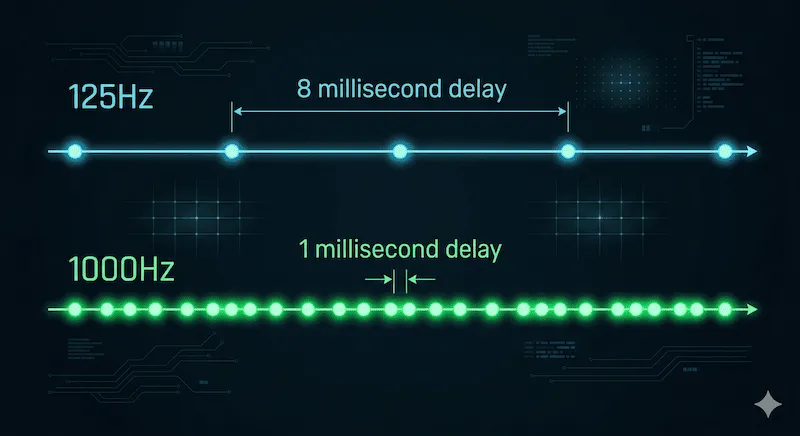
125Hz vs 500Hz vs 1000Hz vs 4000Hz
Converting polling rate to millisecond (ms) delay is a simple mathematical formula: Delay = 1000 / Polling Rate (Hz). Here is a breakdown of industry standards and what you actually need:
| Polling Rate | Input Delay | Ideal Use Case |
|---|---|---|
| 125 Hz | 8.00 ms | Standard office work, Bluetooth mice. Terrible for gaming; causes micro-stutters. |
| 500 Hz | 2.00 ms | Casual gaming, MMOs. Excellent for extending battery life on wireless mice. |
| 1000 Hz | 1.00 ms | (eSports Standard) The golden rule for FPS gaming. Indistinguishable delay for 99% of humans. |
| 4000 Hz / 8000 Hz | 0.25 ms - 0.125 ms | Extreme enthusiasts. Requires a 240Hz+ or 360Hz monitor and a top-tier CPU to notice any benefit without stuttering. |
Why is My 1000Hz Mouse Only Showing 500Hz?
If you bought a high-end mouse but the mouse polling rate test maxes out at 500Hz or 125Hz, do not panic. It is rarely broken hardware. Check these common culprits:
- Software Settings: Out of the box, many mice default to 500Hz to save battery. You must download the manufacturer's software (Razer Synapse, Logitech G Hub, Corsair iCUE) and manually flip the toggle to 1000Hz.
- USB Hub Bottlenecks: Never plug a high-polling-rate gaming mouse into a cheap unpowered USB hub, monitor pass-through port, or keyboard pass-through. Plug it directly into the back of your computer's motherboard.
- Bluetooth Mode: If your mouse has a switch underneath for "2.4Ghz Wireless (Dongle)" and "Bluetooth", ensure it is NOT on Bluetooth. Bluetooth protocol is physically capped at 125Hz (8ms delay).
If you've verified your polling rate is perfect but you are still missing shots due to clicks not registering in time, the issue might lie in your mechanical switches. Use our Mouse Double Click Test to check for micro-switch degradation.
Frequently Asked Questions (FAQ)
What is a good polling rate for gaming?
1000Hz is universally considered the best polling rate for competitive gaming. It provides an imperceptible 1ms delay without unnecessarily taxing your CPU.
Does a higher polling rate affect CPU usage?
Yes. A higher polling rate forces the CPU to process more USB data interrupts per second. While 1000Hz is perfectly fine for modern CPUs, extreme polling rates like 4000Hz or 8000Hz can cause severe game stuttering and frame drops if you have a weak processor.
Why can't I reach 4000Hz in this web test?
Modern web browsers (like Chrome, Edge, and Safari) aggressively throttle the `mousemove` event API to prevent malicious websites from using 100% of your CPU. To truly test an 8000Hz mouse, you often need to use offline desktop applications like MouseTester.
Technical References
The polling rate delay calculations are based on standard Universal Serial Bus (USB) protocol specifications. For deeper dives into how high polling rates interact with monitor refresh rates, we highly recommend reading the articles published by Blur Busters.