Mouse Double Click Test
Diagnose faulty mouse switches instantly. Click the box below to check your left, right, and middle buttons for hardware chattering.
How to Check for Mouse Double Clicking
A "double click issue" occurs when you press your mouse button once, but the computer registers it as two rapid, consecutive clicks. This can ruin your experience in competitive gaming (like misfiring a weapon in an FPS) or cause frustrating errors during office work (like accidentally closing two browser tabs at once). To use our mouse double click test:
- Place your cursor inside the large "Click Here" box above.
- Click your suspected faulty button (Left, Right, or Scroll Wheel) normally.
- If the background flashes red and the "Double Clicks" counter goes up, your mouse has a hardware chattering issue.
Keyboard vs Mouse Chattering
Just like mechanical keyboards, gaming mice use mechanical microswitches. If you suspect your keyboard is also suffering from similar double-typing errors, make sure to use our dedicated Keyboard Chattering Test tool to diagnose individual switch bounce delays.
What Causes Mouse Chattering (Switch Bounce)?
Almost all modern gaming mice (including popular models from Logitech, Razer, and Corsair) use mechanical microswitches—most commonly manufactured by Omron or Kailh. Inside these switches is a tiny piece of U-shaped copper alloy (the tension spring). When you press the button, this spring snaps down to touch an electrical contact pad.
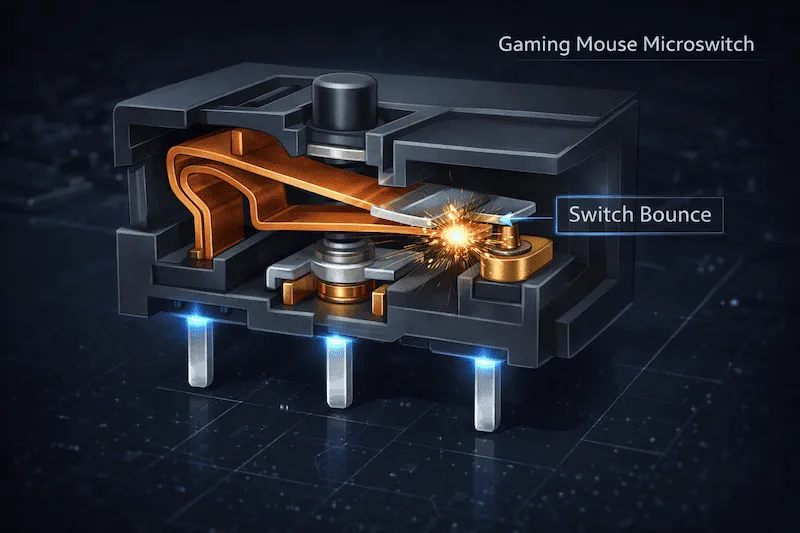
Over months or years of heavy clicking, the copper spring loses its original tension, and the contact pad can become oxidized. When this happens, instead of making a single clean connection, the metal pieces vibrate against each other for a few milliseconds. If this physical vibration (switch bounce) outlasts the firmware's debounce delay, your computer interprets the vibration as a second intentional click.
Double Click Time Thresholds Explained
Our tool uses a highly calibrated JavaScript engine to measure the exact millisecond (ms) delay between your `mousedown` and `mouseup` events. We use an 80ms threshold to determine if a click is humanly possible or a hardware error. Here is how the logic works:
| Time Between Clicks | Diagnostic Result | Explanation |
|---|---|---|
| 0ms - 80ms | Hardware Error (Chatter) | It is biologically impossible for a human to click, release, and click again within 80 milliseconds. If registered, the internal copper spring is physically vibrating. |
| 80ms - 150ms | Drag Clicking / Butterfly Clicking | Usually achieved by advanced Minecraft players dragging their finger across the mouse shell to force rapid actuations. Not necessarily a hardware fault. |
| 150ms+ | Normal Human Click | A standard, healthy click speed. The switch is functioning perfectly. |
How to Fix a Double Clicking Mouse
If our test confirms that your mouse is double clicking, you do not always need to throw it away. Here are the most effective ways to repair the issue, ranging from easy software tweaks to advanced hardware fixes:
- The Static Discharge Trick: Turn off the mouse (or unplug it). Press and hold the faulty button for 30 seconds. Sometimes, built-up static electricity interferes with the digital signal.
- Increase OS Debounce Time (Software): You can download third-party software like "X-Mouse Button Control" (Windows) to instruct your operating system to ignore any secondary clicks that happen within 50ms of the first click. This is a free band-aid fix.
- Desolder and Replace the Microswitch (Hardware): If you know how to use a soldering iron, you can buy replacement Omron or Kailh GM 8.0 switches online for a few dollars. Open the mouse shell, desolder the broken switch from the PCB, and solder the new one in. This makes the mouse perform better than new.
Frequently Asked Questions (FAQ)
How to check for mouse double clicking?
Use our Mouse Double Click Test tool. Rapidly click the test area with your left, right, or middle mouse buttons. If the tool detects two clicks occurring faster than 80ms, it will flag it as a hardware double-click error.
Why does my Logitech mouse double click?
Many modern lightweight gaming mice send lower voltages through their mechanical switches to save battery life. However, these lower voltages are often insufficient to break through the natural oxidation that builds up on the copper contacts over time, leading to severe switch bouncing.
Can an optical mouse switch double click?
Generally, no. Mice equipped with Optical Switches (like newer Razer models) use an infrared light beam instead of a physical metal contact to register clicks. Because there is no metal to "bounce" or oxidize, optical switches are practically immune to traditional chattering.
Hardware References
The debounce thresholds used in this tool are based on standard polling rate physics and human reaction time limits. If you intend to perform a hardware repair, we recommend consulting switch replacement guides on iFixit or watching disassembly tutorials specific to your mouse model.