Mac Keyboard Tester Online
Test your Apple MacBook or Magic Keyboard. Press any key to verify functionality using our native macOS layout.
How to Test MacBook Keyboard Online
Welcome to our dedicated Mac Keyboard Tester. Unlike generic PC testers, this tool is natively mapped to recognize Apple's unique `Command (⌘)`, `Option (⌥)`, and `Control (⌃)` modifiers. To begin testing:
- Click anywhere inside the dark grey testing box above to activate the tool.
- Press every key on your MacBook or Magic Keyboard one by one.
- If the hardware is functioning correctly, the corresponding virtual key on the screen will light up in blue.
Important macOS Security Note
Apple's macOS operating system isolates certain hardware inputs for security reasons. Browsers like Safari and Chrome are physically prevented from reading signals from the Touch ID button, the Power button, and the Fn (Globe) key. If these keys do not light up on the screen, it is a software block, not a hardware failure.
Butterfly Keyboard vs Magic Keyboard Issues
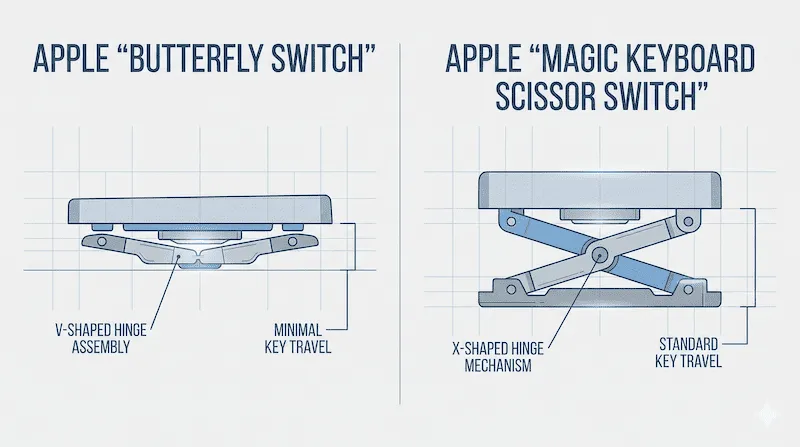
If you own an Apple laptop, knowing which keyboard switch mechanism you have is crucial for diagnosing issues. Apple utilized two vastly different technologies over the past decade:
| Keyboard Type | Years Used | Common Hardware Issues |
|---|---|---|
| Butterfly Keyboard | 2015 - 2019 | Extremely low travel distance. Prone to severe chattering (double typing) or completely dead keys if a single speck of dust enters the delicate V-shaped butterfly mechanism. |
| Magic Keyboard (Scissor Switch) | 2020 - Present | Reverted to traditional reliable scissor switches. Much less prone to dust failure, but can suffer from sticky keys if liquid (like coffee or soda) is spilled. |
How to Fix Unresponsive Mac Keys
If our diagnostic tool confirms that a specific key (like the Spacebar or 'E' key) is not registering, or is double-typing, you can attempt these official Apple-recommended repair steps before visiting the Genius Bar:
- The 75-Degree Rule: Hold your MacBook at a 75-degree angle (almost vertical but tilted slightly backward).
- Compressed Air: Use a can of compressed air with a straw. Spray the keyboard in a left-to-right zig-zag pattern, starting from the top row down to the bottom.
- Rotate: Rotate your Mac onto its right side and repeat the zig-zag spraying, then rotate to the left side and repeat. This is highly effective for dislodging crumbs trapped under Butterfly switches.
If your keys are physically functioning but occasionally typing multiple letters at once, we recommend using our Keyboard Chattering Test to calculate the exact millisecond delay of the faulty switch bounce.
Frequently Asked Questions (FAQ)
How to test a MacBook keyboard online?
Simply click the testing area on this page and press your keys. The virtual Mac layout will highlight the keys that successfully send an electrical signal to the computer. It works on Safari, Chrome, and Firefox.
Does Apple repair butterfly keyboards for free?
Apple previously ran a "Keyboard Service Program" for MacBooks manufactured between 2015 and 2019 that exhibited double-typing or sticky key issues. However, this program usually only covers devices within 4 years of their retail sale date.
Why does my Mac keyboard type double letters?
This is a hardware flaw known as "chattering" or "switch bounce". It occurs when the thin metal dome under the keycap weakens or gets blocked by micro-dust, causing the sensor to register two rapid connections instead of one solid press.
Support References
The cleaning methodology mentioned on this page strictly follows the official documentation provided by Apple Support for cleaning MacBook and Magic Keyboards. If compressed air fails to resolve dead keys, consult an Apple Authorized Service Provider.