Keyboard Chattering Test
Diagnose mechanical switch bounce and double typing issues. Type rapidly below to identify faulty keys.
Mechanical Keyboard Double Typing Test
If you press a key once but your computer registers it multiple times (e.g., typing "Hello" and getting "Heello"), you are experiencing what enthusiasts call "chattering." This mechanical keyboard double typing test helps you identify exactly which switch is failing. Chattering happens because the delicate metal leaves inside the mechanical switch become oxidized, bent, or contaminated with dust. Instead of making a single, clean electrical contact, the metal leaves vibrate or "bounce" rapidly against each other.
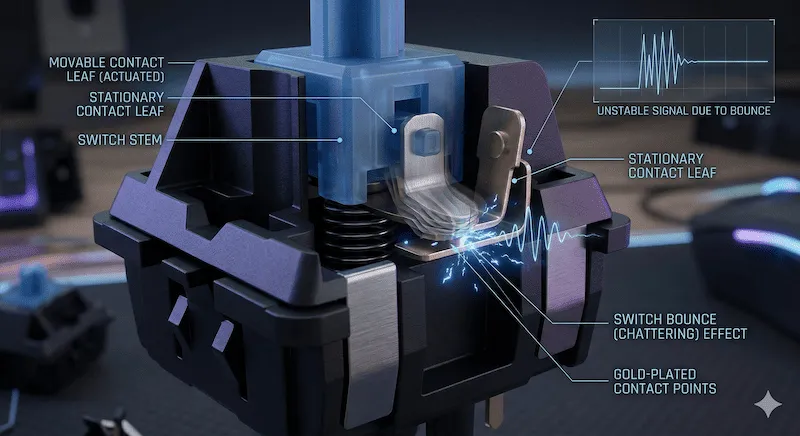
Keyboard Debounce Time Explained
To counteract physical switch bounce, keyboard manufacturers implement a "debounce delay" in the firmware. This tells the microcontroller to ignore any secondary signals from the same key for a specific number of milliseconds (ms). If your switch's physical bounce outlasts this firmware delay, double typing occurs. Use our slider above to adjust the threshold and match your keyboard's specifications.
| Threshold Setting (ms) | Keyboard Type / Switch | Diagnostic Meaning |
|---|---|---|
| 10ms - 20ms | Optical & Magnetic (Hall Effect) | Extreme sensitivity. These switches have no physical metal contacts, so any double typing at this level indicates a firmware or sensor issue rather than physical wear. |
| 30ms - 50ms | Standard Mechanical (Cherry MX, Razer) | (Recommended) The industry standard. If a switch registers twice under 40ms, the metal contact is highly likely to be physically defective or heavily oxidized. |
| 60ms - 100ms | Membrane Keyboards / Heavy Typists | High tolerance. Prevents false positives if you tend to bottom out keys slowly and heavily, allowing the mechanism more time to reset. |
How to Fix Keyboard Chattering
Once our tool helps you identify the exact chattering keys via the Event Log, you have a few options to fix the double typing issue:
- Compressed Air: Sometimes, dust or debris gets trapped between the contact leaves. Press the stem of the switch down and blow compressed air directly into the housing to clear the blockage.
- Replace the Switch: If you own a hot-swappable keyboard, this is the easiest route. Use a switch puller to safely remove the faulty switch and press a new one directly into the PCB socket.
- Software Fixes: If you cannot solder or easily replace the switch, you can use OS-level software (like "Keyboard Chattering Fix" for Windows) to artificially increase your computer's digital debounce delay.
Is Keyboard Chattering a Hardware or Software Issue?
In 95% of cases, chattering is a physical hardware degradation. However, severely overloaded CPU resources, outdated motherboard drivers, or polling rate bugs can occasionally cause OS-level input stuttering that mimics double typing. You can use our Keyboard Latency Test to rule out system bottlenecks and verify your polling rate.
Frequently Asked Questions (FAQ)
What is keyboard chattering?
Keyboard chattering (also known as switch bouncing) is a hardware degradation issue where a single key press is erroneously registered as multiple keystrokes by the computer. It most commonly affects aging mechanical keyboards.
How do I test my keyboard for double typing?
Use our Chattering Test tool above. Set the diagnostic threshold (we recommend 40ms) and type normally or repeatedly tap the suspected key. If the key registers twice within that millisecond window, the tool will highlight it in red as a chattering event.
Can membrane keyboards suffer from chattering?
While much less common than in mechanical switches, membrane keyboards can experience double typing if the rubber dome underneath the keycap tears or if conductive debris interferes with the membrane matrix.
Hardware References & Community Resources
The debounce algorithms and threshold theories utilized in this diagnostic tool are modeled after the physical specifications outlined in the Cherry MX Developer Guide. For DIY repair guides on desoldering chattering switches, we highly recommend consulting the wiki at r/MechanicalKeyboards.