Jitter Click Test Online
Challenge your limits. Click the blue pad as fast as humanly possible to measure your ultimate CPS (Clicks Per Second) in a 10-second sprint.
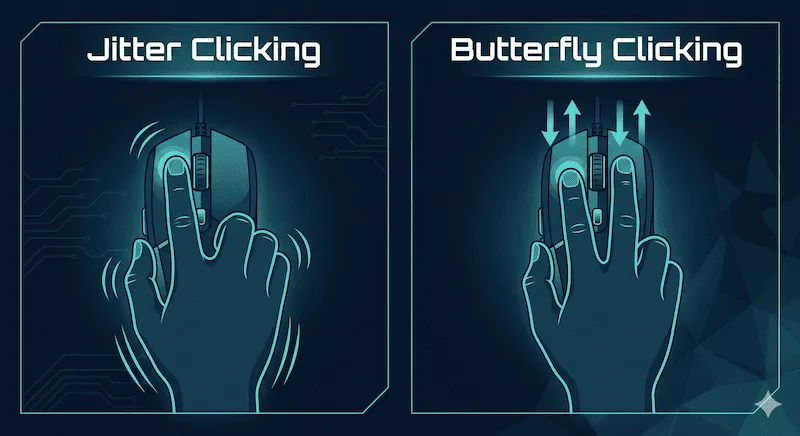
What is Jitter Clicking vs Butterfly Clicking?
In competitive gaming scenarios (especially Minecraft PvP), having a high CPS gives you a distinct advantage in combat and building. Over the years, players have developed extreme physical techniques to bypass normal human clicking limits. Here is the difference between the two most popular methods:
- Jitter Clicking: This involves tensing the muscles in your forearm and wrist to create a rapid vibration. You transfer this spasm directly into your index finger, which rests stiffly on the left mouse button. It is exhausting but effective.
- Butterfly Clicking: This requires two fingers (usually the index and middle finger). You alternate striking the left mouse button rapidly, mimicking the flapping wings of a butterfly. This takes advantage of the "double-click" threshold on certain gaming mice to register massive amounts of inputs.
A Note on Hardware Limits (Debounce Time)
You can have the fastest fingers in the world, but if your mouse has a high "Debounce Time" hardcoded into its firmware, it will mathematically ignore your extra clicks. If you are practicing Butterfly Clicking but your score won't go past 12 CPS, your mouse is holding you back. You can test your hardware's debounce delay using our Chattering & Bounce Test.
Average CPS Scores by Clicking Method
Curious where you stand globally? Use our jitter click test above for 10 seconds. Once you get your final score, compare it against this tier list of clicking methods:
| Clicking Method | Average CPS Range | Difficulty / Risk |
|---|---|---|
| Normal Clicking | 5 - 8 CPS | Easy / No physical risk. |
| Jitter Clicking | 10 - 14 CPS | Hard / High risk of forearm fatigue. |
| Butterfly Clicking | 15 - 22 CPS | Medium / Requires a mouse with wide left buttons. |
| Drag Clicking | 30 - 40+ CPS | Extreme / Requires high-friction mouse grip tape. |
How to Increase Your CPS Safely
If you want to dominate the leaderboards without injuring your hand, follow these rules:
- Warm Up: Never start jitter clicking cold. Do some basic wrist rotations and finger stretches.
- Change Your Grip: For butterfly clicking, use a "Palm Grip" to anchor the base of your hand, freeing up your two fingers to flutter effortlessly.
- Invest in a Good Mouse: Buy a mouse (like Glorious Model O or Roccat Kain) that allows you to lower the "Debounce Time" to 0ms or 4ms in the software.
Frequently Asked Questions (FAQ)
Is jitter clicking bad for you?
Yes, if done excessively. The unnatural muscle tension required for jitter clicking can lead to severe hand fatigue, cramps, and over time, repetitive strain injuries (RSI) or carpal tunnel syndrome. Always take frequent breaks.
What is a good CPS for Minecraft?
For standard combat (1.8 PvP), maintaining 10 to 12 CPS is considered excellent and will give you a strong competitive edge in taking reduced knockback. Anything above 15 CPS is usually overkill or requires butterfly clicking.
Why is my CPS lower on the 10-second test than the 1-second test?
Stamina. Anyone can spam clicks for 1 second, but maintaining that intense muscle vibration for a full 10 seconds causes lactic acid build-up, naturally slowing down your fingers. The 10-second test is a much more accurate representation of your true gaming speed.
Gaming Community References
CPS requirements and combat mechanics referenced here are based on the legacy competitive standards of the Hypixel Network. Please adhere to server rules, as some communities ban software macros and auto-clickers.