English to Hindi Typing Online
Type in English (Hinglish) and hit Space. It automatically converts to Hindi (Devanagari).
Type in Hindi Using English Keyboard
Welcome to our free online English to Hindi typing tool. Writing in Hindi can be challenging if you don't have a specialized physical keyboard or the technical knowledge to install complex fonts like Kruti Dev or Mangal. By using our phonetic transliteration engine, you can bypass these hardware limitations entirely. Once you are comfortable with the output, you can rigorously check your typing speed by visiting our dedicated Hindi Typing Test page.
Hinglish to Hindi Text Converter Explained
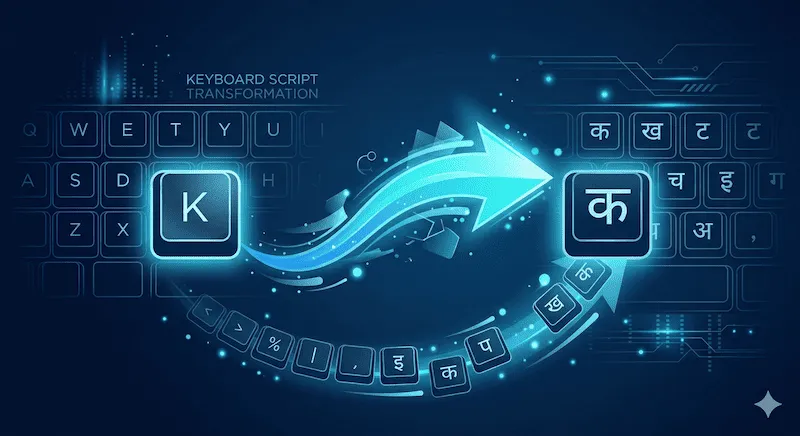
Phonetic typing means typing a word exactly as it sounds using English letters (commonly referred to as Hinglish). For example, to type "भारत" (India), you simply type "bharat" on your standard US QWERTY keyboard and hit the Spacebar. The API recognizes the phonetic structure and instantly replaces the English text with flawless Devanagari script. It is the most intuitive way for the global diaspora to communicate in their mother tongue.
Common Phonetic Typing Examples
Below is a quick reference table showing how everyday English (Latin) keystrokes are automatically converted into Hindi characters using our tool:
| Type in English (Hinglish) | Press Key | Hindi Output | Meaning |
|---|---|---|---|
| namaste | Spacebar | नमस्ते | Hello / Greetings |
| shukriya | Spacebar | शुक्रिया | Thank You |
| kya haal hai | Spacebar | क्या हाल है | How are you? |
| bahut accha | Spacebar | बहुत अच्छा | Very Good |
English to Hindi Translation vs Transliteration
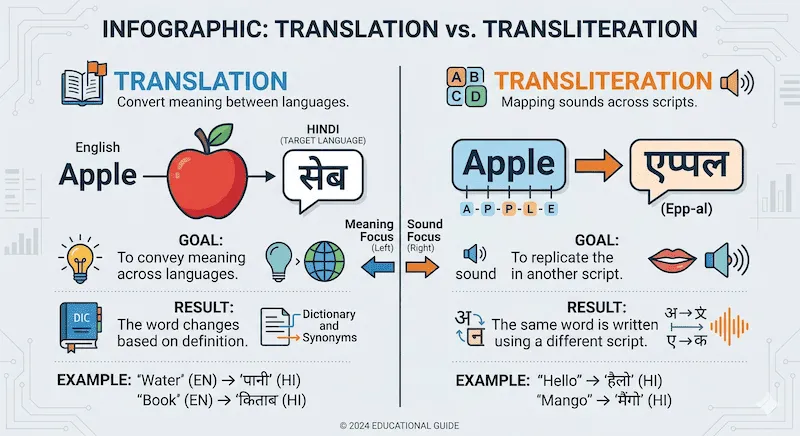
Many users search for "English to Hindi translation typing," but it is important to understand the fundamental difference between translation and transliteration to use this tool effectively:
- Translation (Meaning): If you type the English word "Apple", a translator will change it to its Hindi meaning: सेब (Seb).
- Transliteration (Sound): This tool performs transliteration. If you type "Apple", it matches the sound and produces: एप्पल.
Our tool is designed for the latter. You must type the Hindi pronunciation using English letters (Hinglish) to get the correct Devanagari output.
Online Hindi Phonetic Keyboard Advantages
While there are several methods to type in Hindi, utilizing a web-based English to Hindi converter offers distinct advantages over traditional software downloads:
| Feature | Benefit to You |
|---|---|
| Zero Installation | Many office computers restrict installing third-party Input Method Editors (IMEs) like Google Indic Keyboard. Our tool works perfectly inside any browser. |
| Fast Muscle Memory | You do not need to memorize a new complex layout like Inscript. You use your existing typing speed on a standard English keyboard. |
| Cross-Platform | Whether you are on a Windows PC, a MacBook, or a mobile device, the typing experience remains consistent, fast, and highly responsive. |
| Copy and Paste Ready | With a single click of the 'Copy to Clipboard' button, your text is formatted and ready to be pasted into WhatsApp, Word documents, or social media. |
If you encounter hardware issues where your keys are double-typing or failing to register during rapid input, we highly recommend verifying your switch health using our homepage Computer Keyboard Test tool.
Frequently Asked Questions (FAQ)
How do I type in Hindi using an English keyboard?
Simply type your words in English letters (Hinglish) into the text box above and press the Spacebar. Our API will automatically process the phonetic sound and convert your English words into correct Hindi (Devanagari) script.
What is the difference between Hindi transliteration and translation?
Transliteration changes the script based on sound (e.g., typing 'Apple' becomes 'एप्पल'). Translation changes the meaning of the word (e.g., 'Apple' becomes 'सेब'). This tool performs phonetic transliteration.
Is this English to Hindi typing tool free?
Yes, our transliteration tool is 100% free to use. There are no limits on how many words you can type, convert, or copy. You don't even need to create an account.
Do I need to download any Hindi typing software?
No download or installation is required. This tool functions entirely in the cloud via your web browser. This makes it incredibly safe and convenient for use on public or office computers where you cannot change system settings.
What happens if the converted word is wrong?
Because phonetic typing relies on pronunciation, sometimes a word might have multiple Hindi spellings. If the conversion isn't exactly what you meant, you can backspace and try spelling the English word slightly differently (e.g., changing 'i' to 'ee').
Data & Technical References
The transliteration engine utilized on this page references the phonemic mapping standards outlined by the Unicode Consortium and leverages cloud-based phonetic APIs to ensure grammatical accuracy in modern Devanagari. Input methodologies are aligned with best practices recommended by Google Input Tools.