Data Entry Typing Test
Practice and measure your WPM and accuracy to pass employment screening tests for data entry, clerical, and administrative roles.
How Many WPM Do You Need for Data Entry?
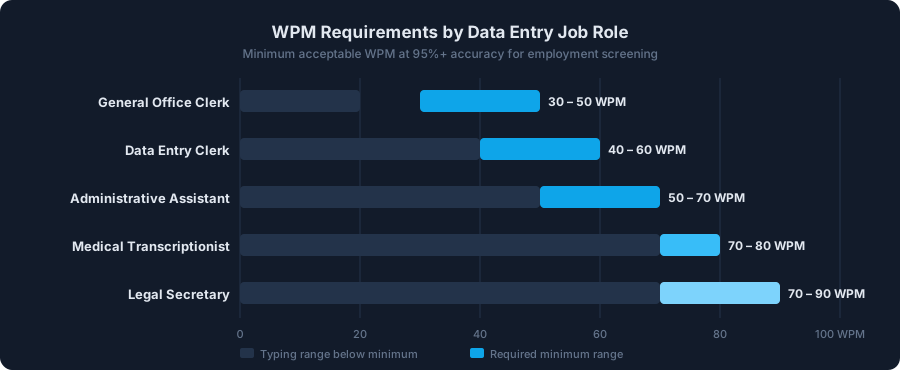
The most common question job seekers ask before their screening is: how fast do I actually need to type? The answer depends on the industry, but here is the short version: 40 WPM gets you in the door for most general clerical roles; 60+ WPM is where you become a competitive candidate. Accuracy matters just as much as speed — most employers use net WPM, which penalizes every uncorrected error, so a clean 50 WPM at 97% accuracy will outperform a messy 65 WPM at 85% accuracy in the actual score.
| Job Role | Min. WPM | Min. Accuracy | Typical Test Duration | Notes |
|---|---|---|---|---|
| General Office Clerk | 30 – 40 WPM | 95% | 3 – 5 min | Light clerical, filing, and basic form entry. |
| Data Entry Clerk | 40 – 60 WPM | 95% | 5 min | Core standard for back-office and processing roles. |
| Administrative / Executive Assistant | 55 – 70 WPM | 97% | 5 min | Includes drafting correspondence and managing records. |
| Medical Transcriptionist | 70 – 80 WPM | 98% | 10 min | High accuracy required due to patient safety implications. |
| Legal Secretary | 70 – 90 WPM | 98% | 5 – 10 min | Complex legal terminology with near-zero error tolerance. |
| Financial / Banking Data Entry | 10,000 – 14,000 KPH | 99% | 5 min (numeric) | Often measured in KPH. Use the 10 Key Test to practice. |
KPH vs. WPM: Which Metric Does Your Employer Measure?
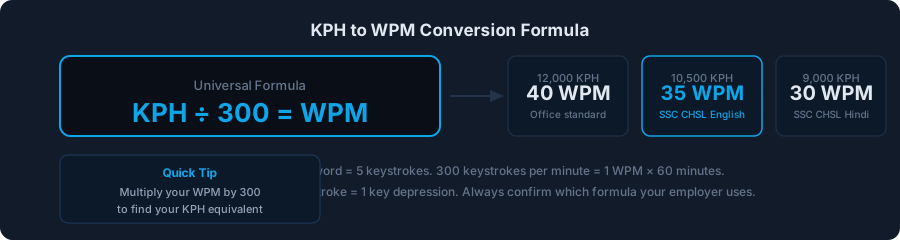
This is one of the most misunderstood points in data entry hiring. WPM (Words Per Minute) counts standardised 5-character "words" — so typing "hello" counts as 1 word. KPH (Keystrokes Per Hour) counts every individual key press, making it the preferred metric for numeric entry roles like payroll, banking, and insurance claims where you never type full English sentences.
The good news: converting between the two is simple. KPH ÷ 300 = WPM. So if a job ad says "10,000 KPH required", that is roughly 33 WPM. If it says "12,000 KPH", that is 40 WPM. This tool measures WPM — use the formula below to set your personal target whenever you see a KPH requirement.
What Is 10,000 KPH in WPM?
Here are the most frequently asked conversions:
- 8,000 KPH = ~27 WPM — entry-level numeric data entry roles
- 10,000 KPH = ~33 WPM — standard clerical benchmark
- 12,000 KPH = ~40 WPM — competitive general office standard
- 15,000 KPH = 50 WPM — experienced professional benchmark
- 18,000 KPH = 60 WPM — senior administrative and medical transcription entry bar
For roles that are purely numeric (number pads, spreadsheet entry), we recommend combining this test with our 10 Key Typing Test, which simulates the numeric keypad environment that financial data entry operators use every day.
Net WPM vs. Gross WPM: What Is the Difference?
When employers say "40 WPM required", they almost always mean net WPM, not gross. Here is the difference:
- Gross WPM = total characters typed ÷ 5 ÷ minutes. No penalty for errors.
- Net WPM = (total characters ÷ 5 ÷ minutes) − errors. Every uncorrected mistake subtracts directly from your score.
This tool displays net WPM. If you typed 60 gross WPM but made 10 uncorrected errors in a 1-minute test, your net score is 50 WPM. This is why correcting errors as you type is almost always worth the 0.5-second recovery time — an uncorrected error costs you a full WPM from the final score. The one exception is government exam software (such as SSC CHSL), where backspacing may itself be counted as an additional error keystroke. For standard employment screening with platforms like eSkill or Criteria Corp, correct your errors freely.
How to Improve Your Typing Speed for a Data Entry Test
The single most reliable method to raise your data entry WPM is deliberate daily practice at the correct test duration. Here is what works, based on the mechanics of how typing speed is actually built:
- Match your practice duration to your real exam. If the employer test is 5 minutes, do not only practice 1-minute sprints. Short tests let you peak without building the stamina you need. Switch to the 5-minute tab above and commit to full sessions.
- Accuracy before speed — always. Set a personal rule: never move faster than the speed at which you can maintain 96% accuracy. Chasing WPM at the cost of errors trains bad habits that are very difficult to break later.
- Identify your personal error keys. After each session, notice which characters you consistently mistype. For most people, it is the number row, the keys B and N (both struck by the right index finger via different motions), and rarely-used characters like Q, Z, and X.
- Practice touch typing — no keyboard glancing. Looking down interrupts your reading rhythm and caps your speed. Place a cloth over your hands if you cannot stop glancing. The initial discomfort disappears within two to three weeks of consistent practice.
- 15 minutes per day beats 90 minutes on weekends. Typing is a motor skill, not a knowledge skill. Consistent daily repetition builds muscle memory far more efficiently than infrequent long sessions.
Why You Should Practice with 5-Minute Tests
A 1-minute test captures your peak burst speed. A 5-minute test captures something more useful: your sustainable speed. Most real employment assessments run 3–10 minutes specifically because employers want to see consistency, not a single impressive minute. When you practice 5-minute sessions, you will almost certainly notice your WPM drops after the second minute — that drop is exactly what you are training to eliminate. If your 1-minute WPM is 55 but your 5-minute WPM is 42, your bottleneck is stamina, not raw speed.
What Does a Real Data Entry Test Look Like?
Most mid-to-large employers use third-party platforms to administer typing assessments. The most common ones in the US are eSkill, Criteria Corp (HireSelect), Kenexa (IBM), and Wonderlic. The format is nearly identical across all of them: a passage of text is displayed on screen, and you reproduce it in a text box under a running timer. The software calculates net WPM and accuracy automatically and sends the result to the hiring manager.
A small number of employers still use their own internal timing software or even a basic Google Form. Regardless of the platform, the underlying skill being measured is identical — and the tool above is an accurate simulation of every format. When you can hit your target WPM consistently on the 5-minute test here, you are ready for any employer's version of the same assessment.
Frequently Asked Questions
How many WPM do I need for a data entry job?
Most data entry positions require 40 to 60 WPM at 95% accuracy as the minimum. Specialist roles like medical transcription or legal secretary typically start at 70 WPM. The fastest way to know: check the job posting for the exact cutoff, then use the appropriate test duration above to benchmark yourself.
What is 10,000 KPH in WPM?
10,000 KPH is approximately 33 WPM (10,000 ÷ 300 = 33.3). The standard formula is KPH ÷ 300 = WPM. So a 12,000 KPH requirement equals 40 WPM, and 15,000 KPH equals 50 WPM.
What is the difference between net WPM and gross WPM?
Gross WPM is your raw typing speed with no penalty for errors. Net WPM subtracts each uncorrected error from your gross score — and this is the number employers almost universally use. This tool displays net WPM, just like real employment assessments.
How long is a typical data entry typing test?
The most common formats are 3 minutes and 5 minutes. Some government and healthcare employers use 10-minute tests to assess stamina. The 5-minute tab above is the most universally applicable practice format for employment screening.
Is 40 WPM fast enough for data entry?
Yes — 40 WPM at 95%+ accuracy meets the minimum for most general clerical and data entry positions. However, competition for good roles is significant, so being able to score 50–55 WPM consistently will make you a noticeably stronger applicant. Use the tool above to benchmark where you currently stand.
Does typing accuracy matter more than speed for data entry?
In most cases, yes. Because employers use net WPM (which penalizes errors), a clean 50 WPM at 97% accuracy produces a higher net score than a sloppy 60 WPM at 87% accuracy. Additionally, data entry errors cause real operational costs downstream, so accuracy is often weighted more heavily than pure speed in hiring decisions.