Controller Stick Drift Test Online
Diagnose analog stick drift on your PS5 DualSense, Xbox, or Nintendo Switch gamepad. Calculate your perfect deadzone settings.
Gamepad Deadzone Calculator & Settings
If you are playing precision shooters like Call of Duty: Warzone or Apex Legends, adjusting your in-game deadzone is critical. A "Deadzone" is a software-level blind spot that tells the game to ignore tiny hardware movements. Use the raw data from our controller drift test above to find your perfect setting:
| Tester Raw Output (Deviation) | Drift Severity | Recommended In-Game Deadzone |
|---|---|---|
| 0.000 to 0.020 | Excellent (Like New) | 2% to 3% (Linear response, peak competitive advantage) |
| 0.020 to 0.050 | Normal Wear | 5% to 6% (Standard default for most console games) |
| 0.050 to 0.120 | Moderate Drift | 10% to 15% (You will start feeling input sluggishness) |
| 0.150+ | Severe Hardware Failure | Requires Physical Repair. Software deadzones will make the game unplayable. |
What Causes Controller Stick Drift?
Whether you own a PS5 DualSense, Xbox Series X/S controller, or Nintendo Switch Joy-Con, they all share the same fundamental flaw: they use ALPS Potentiometers. Inside the joystick module, there are physical carbon film tracks. When you move the stick, a metal wiper scrapes against this carbon track to measure electrical resistance.
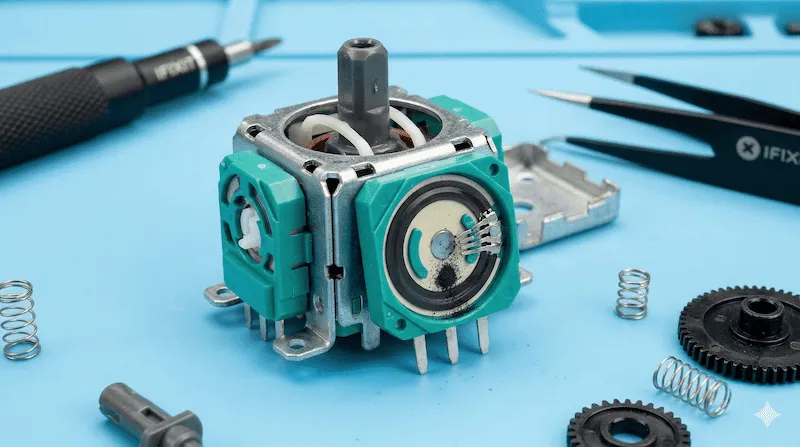
Over hundreds of hours of intense gaming, the friction grinds the carbon film into dust. This dust interferes with the electrical signal, causing the controller to tell the console that the stick is moving, even when your thumbs are completely off it.
How to Fix Stick Drift (ALPS vs Hall Effect)
If our diagnostic tool confirms severe drift (a red warning status), you have three main avenues for repair:
- The Temporary Fix (Contact Cleaner): You can open the controller shell and spray a small amount of WD-40 Specialist Electrical Contact Cleaner (NOT regular WD-40) into the potentiometer housing. Rotate the stick vigorously. This temporarily clears out the carbon dust.
- The Solder Repair (Replace ALPS): If you have soldering skills, you can buy replacement ALPS 3D analog joystick modules online for under $10, desolder the broken one from the PCB, and install the new one.
- The Permanent Upgrade (Hall Effect): The ultimate solution is to upgrade to a controller that uses Hall Effect sensors (like the Gulikit KingKong or 8BitDo Ultimate). Instead of physical scraping, Hall Effect sticks use magnets to measure distance. Because there is no physical contact, they are completely immune to traditional stick drift.
If you suspect that your controller's face buttons (X, O, A, B) are also failing to register or double-clicking, you should apply the same diagnostic logic we use in our Mouse Double Click Test and Latency Test to check the polling response.
Frequently Asked Questions (FAQ)
How do I know if my controller has stick drift?
If your character or camera in-game moves slowly on its own without you touching the analog sticks, you have stick drift. You can verify the exact severity using our online Controller Drift Test above to see the raw X and Y axis inputs.
Does PS5 or Xbox warranty cover stick drift?
Yes. Both Sony and Microsoft generally cover stick drift under their standard 1-year manufacturer hardware warranty. You will need to locate your serial number and initiate an RMA claim through their official support portals.
What is a normal deadzone for a controller?
A healthy, brand-new controller usually requires a deadzone of 3% to 5%. If your controller requires a deadzone higher than 10% to prevent the crosshair from moving on its own, the internal potentiometer is severely worn.
Hardware Repair References
The potentiometer degradation principles explained here are based on teardowns and hardware analyses provided by iFixit's DualSense Teardown. If you are attempting a DIY repair, always disconnect the battery first to avoid short-circuiting the PCB.